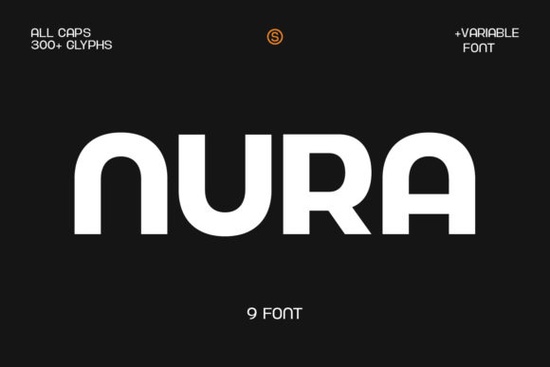
If you need a clean, readable typeface that works across print and digital projects, Nura Font delivers exactly that. It is a straightforward sans serif design built for clarity, making it a practical choice for logo work, shop branding, and everyday design tasks. Instead of chasing trendy letterforms that date quickly, this typeface focuses on balanced proportions and consistent spacing. That means your headlines stay sharp, your subheadings remain legible, and your overall layout looks polished without extra effort.
What makes this sans serif typeface a reliable choice?
Designers and small business owners often choose simple letterforms because they reduce visual noise. Nura follows that same principle. The strokes are even, the curves are controlled, and the character set covers the essentials for most English-language projects. When you are setting block letters for a poster or drafting a clean subheading for a website, the uniform weight keeps everything aligned. Crafters and print-on-demand sellers also appreciate how well it converts to cut files and mockups. Clean edges mean fewer weeding issues on vinyl, and crisp rendering helps product photos look professional. If you want to explore more options in this style, you can browse our collection of modern sans serif picks to see how different weights compare.
Which design projects get the best results?
This typeface shines when you need readability at a glance. Think about storefront signage, packaging labels, or social media graphics where viewers scroll quickly. The straightforward geometry ensures that letters do not clash, even when you tighten the tracking for a compact layout. Many creators use it for:
- Brand logos that need to scale from business cards to banners
- Product packaging where care instructions must stay clear
- Podcast cover art and thumbnails that require instant recognition
- Apparel designs where clean text prints reliably on different fabrics
Because the design avoids heavy embellishments, it adapts well to both light and dark backgrounds. You can adjust opacity or add a subtle shadow without losing the original letter shapes.
How do I pair it with other typefaces?
A neutral sans serif works best when it supports a stronger personality font rather than competing with it. If you are building a brand kit, try using Nura for body copy or secondary headlines while letting a script or display font take the spotlight. For example, you might combine it with a relaxed handwritten style for quotes and signatures to create a friendly layout. When you need something softer for lifestyle brands or bakery packaging, a rounded playful alternative can add warmth to your headers while this font keeps the details readable. The key is contrast: pair clean geometry with organic curves, or match similar x-heights for a cohesive look.
What do I need to know before downloading?
Most font marketplaces provide desktop and web licenses, so check the usage terms before adding the files to commercial projects. Installation is straightforward on both Mac and Windows. Once the .ttf or .otf files are in your system folder, the typeface will appear in design software like Canva, Illustrator, Photoshop, and Cricut Design Space. If you plan to sell physical items or digital templates, verify whether the license covers print-on-demand sales or client work. For a quick reference on licensing and file formats, you can review the official details for Nura Font before purchasing. Keeping your font folder organized with clear naming conventions will also save time when you switch between client briefs.
How can I test it before committing to a full layout?
Start by typing out your actual brand name, tagline, and a short paragraph of body text. Check how the letterspacing looks at different sizes, especially between 12px and 18px for screen use. Print a sample sheet on your intended paper stock, since ink absorption can slightly thicken thin strokes. If you are cutting vinyl or heat transfer material, run a small test cut to confirm that the internal counters of letters like a, e, and g remain intact. Adjust tracking by +10 or +20 if the text feels too tight, and avoid stretching the font horizontally.
Before you finalize your design, run through this quick checklist:
- Verify the license matches your intended use (personal, commercial, or POD)
- Test readability at small sizes and on mobile screens
- Check contrast against your background color for accessibility
- Export a print proof to catch any spacing or alignment shifts
- Save a styled text preset in your design software for faster future edits
Keep your layout simple, let the clean letterforms do the work, and you will have a professional result that holds up across every medium.
Get Started Craft Authentic Projects with Handwriting Fonts
 Craft Projects with the Playful Muffin Font
 Get Creative with Glossy Bubble Fonts
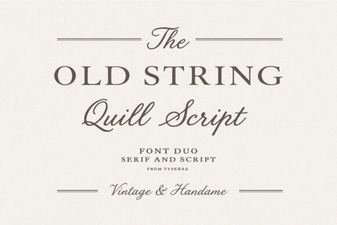 Old String Font Designs for Modern Creativity
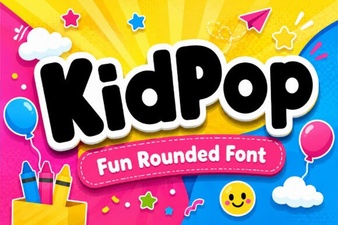 Kidpop Fonts: Playful Designs for Creative Projects
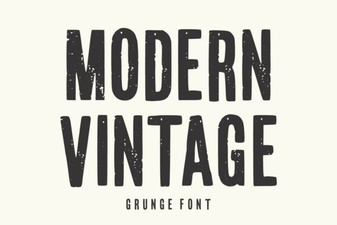 Modern Vintage Fonts for Creative Design Projects